-1.webp)
-1.webp)
-2.webp)
























Why Does My Vape Pen Keep Blinking?
Last Updated: April 30, 2026
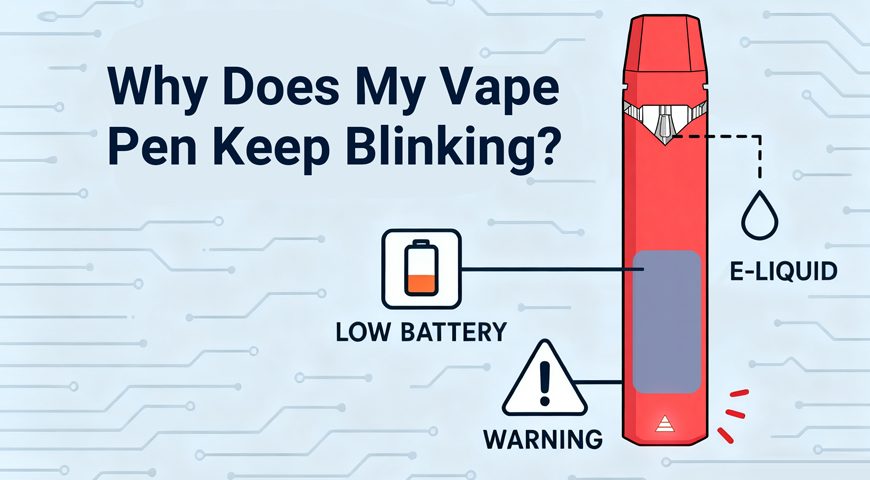
“Why does my vape pen keep blinking?” is one of the most common questions customers ask when a device suddenly stops behaving the way they expect. The problem is that a blinking light does not always mean the same thing. For one customer, it may point to a low battery. For another, it may be a cartridge connection issue, a clogged airway, a locked device, or a compatibility mismatch.
For readers who want a quick visual walkthrough, this YouTube explainer covers the most common reasons a vape pen blinks when you try to hit it, including low battery, connection problems, and short-circuit issues: How can I fix my vape pen when it blinks when I hit it?
To understand what blinking usually means in real customer situations, we reviewed 100 support tickets involving vape pens, cartridge batteries, and disposable vape devices. Each ticket was grouped by the most likely cause and the final support outcome. The result was clear: most blinking complaints were fixable, and only a small share turned out to be true internal hardware failure.
This review is designed for adult vape users who want a more practical way to diagnose a blinking device. It is not a replacement for the manufacturer’s instructions, and users should always stop using a device if it becomes hot, damaged, swollen, leaking, or unsafe to handle.
What We Reviewed
We looked at 100 support tickets where customers described a vape pen that kept blinking, blinked while charging, blinked but would not hit, or blinked when paired with a cartridge. The tickets were categorized by symptom pattern, support diagnosis, and final resolution. This allowed us to separate simple user-side fixes from cases that required replacement or refund support.
The seven categories were depleted battery or charging issue, connection issue or short circuit, clogged cartridge airflow, locked device or user error, overheat protection or cut-off limit, cartridge incompatibility, and defective hardware or internal failure. The biggest finding was that the first four categories accounted for 85% of all cases. In other words, most blinking complaints were not caused by a completely dead device.
| Pattern Category | Ticket Count | Resolution Rate | Primary Fix / Outcome |
|---|---|---|---|
| Depleted Battery / Charging Issue | 35 | 95% | Customer was guided to fully charge the device using an appropriate adapter. |
| Connection Issue / Short Circuit | 25 | 80% | Customer was instructed to clean contacts with rubbing alcohol or gently adjust the connection pin. |
| Clogged Cartridge Airflow | 15 | 70% | Customer was advised to use preheat or gently clear the airway to bypass the draw-sensor error. |
| Device Locked / User Error | 10 | 100% | Customer was educated on the standard 5-click lock and unlock mechanism. |
| Overheat Protection / Cut-off Limit | 7 | 90% | Customer was told about the 8-10 second draw limit designed to prevent overheating or cartridge burning. |
| Cartridge Incompatibility | 5 | 20% | Support identified a resistance mismatch between the cartridge and battery. |
| Defective Hardware / Internal Failure | 3 | 0% | Device was deemed bricked, and warranty replacement or refund was initiated. |
1. Depleted Battery or Charging Issue
The most common cause was also the simplest: the device needed a proper charge. This category represented 35 out of 100 tickets and had a 95% resolution rate. Customers often described the issue as “it keeps blinking,” “it blinks when I try to hit it,” or “it blinks but nothing comes out.”
In many of these cases, the device was not fully charged, the charger was not making stable contact, or the adapter was not suitable for the battery. Support usually asked the customer to connect the device to the correct charging cable and adapter, leave it charging for the recommended time, and then test it again. A successful charge often solved the blinking issue without further action.
This pattern matters because many users assume blinking means the pen is broken. In the ticket review, low or unstable battery power was the largest single category. If a vape pen keeps blinking, charging should usually be the first step before assuming the device has failed.
2. Connection Issue or Short Circuit
The second most common pattern was a connection issue between the battery and cartridge. This appeared in 25 out of 100 tickets and had an 80% resolution rate. Customers often said the battery worked with one cartridge but blinked with another, or that the device blinked immediately after the cartridge was attached.
The usual fix was contact cleaning or gentle pin adjustment. Residue, oil leakage, dust, or a depressed contact pin can prevent the battery from reading the cartridge correctly. Support commonly instructed customers to clean the contact points with rubbing alcohol, let the area dry completely, and avoid overtightening the cartridge.
3. Clogged Cartridge Airflow
Clogged airflow accounted for 15 out of 100 tickets, with a 70% resolution rate. These customers usually reported that the device blinked during a draw, produced little or no vapor, or felt blocked when they tried to inhale. In some cases, the draw sensor could not activate correctly because airflow was restricted.
Support typically advised customers to use the preheat function if the device had one, take a few gentle pulls without forcing the device, or carefully clear the airway according to the product instructions. This pattern was especially relevant when thicker oil, cold conditions, or residue buildup made the cartridge harder to draw from.
The important lesson is that blinking can sometimes be an airflow symptom, not a battery symptom. If the device lights up but will not produce vapor, and the cartridge feels tight or blocked, airflow should be checked before replacing the battery.
4. Device Locked or User Error
Ten tickets were caused by lock-mode confusion, and this category had a 100% resolution rate. The customers did not have a broken device. They had a device that was turned off or locked through the standard 5-click mechanism.
This issue often happens when users are unfamiliar with button-operated vape batteries. A device may blink to confirm that it has been turned on or off, but the customer may interpret that blinking as an error. Support resolved these cases by explaining how to press the button five times quickly to unlock or activate the device.
This category is a reminder that simple instructions can prevent unnecessary support requests. For hardware brands, lock-mode education should be visible in packaging, quick-start cards, and post-purchase messages. For users, it is worth checking whether the device is locked before assuming the battery or cartridge is faulty.
5. Overheat Protection or Cut-Off Limit
Seven tickets were related to overheat protection or automatic cut-off behavior, with a 90% resolution rate. These customers often noticed blinking after taking a long draw or several draws in quick succession. The device was not failing; it was limiting operation to prevent overheating or cartridge burning.
Many vape pens include an automatic cut-off after an extended inhale, often around 8-10 seconds depending on the device design. When that limit is reached, the device may blink to show that it has stopped heating. This can surprise users who are used to longer draws or who do not realize the device has a built-in protection feature.
The fix was mostly educational. Support explained the draw limit, recommended shorter draws, and asked customers to let the device rest between sessions. This category had a high resolution rate because the blinking was normal device behavior once the customer understood what it meant.
6. Cartridge Incompatibility
Cartridge incompatibility was less common but harder to resolve. It appeared in 5 out of 100 tickets and had only a 20% resolution rate. These cases usually involved a mismatch between the cartridge resistance and the battery’s supported operating range.
Customers often believed any cartridge with the same thread type should work with any compatible-looking battery. In practice, the electrical requirements can still differ. If the battery detects resistance outside its safe or supported range, it may blink instead of firing.
This category had a low resolution rate because cleaning, charging, and unlocking the device usually could not solve the mismatch. The practical fix was to use a compatible cartridge or a battery designed for that cartridge type. For brands, this is where clear compatibility guidance can reduce complaints and prevent unnecessary warranty claims.
7. Defective Hardware or Internal Failure
Only 3 out of 100 tickets were categorized as defective hardware or internal failure. These were the cases where the device was considered bricked after basic troubleshooting did not restore function. The resolution rate was 0% because there was no customer-side fix available.
In these situations, support moved to warranty replacement or refund handling. This category included devices that could not charge, could not fire, could not be reset, or continued blinking after all normal troubleshooting steps were completed. The key difference was that the issue remained across multiple tests, not just with one cartridge, one cable, or one user action.
This is why the review matters. Defective hardware does happen, but it was not the leading explanation for blinking complaints. A better troubleshooting process helps users solve fixable issues first while still escalating true failures when needed.
What the Data Suggests
The strongest insight from the 100-ticket review is that blinking is usually a signal, not a diagnosis. The same visible behavior can point to several different causes. A blinking vape pen may need charging, cleaning, unlocking, cooling, airflow support, a compatible cartridge, or full replacement.
The first four categories made up 85% of all cases, and those were generally the most fixable. Depleted battery, connection issue, clogged airflow, and lock-mode confusion are all problems that support teams can often resolve through clear instructions. By contrast, cartridge incompatibility and internal failure were less common but more likely to require a product change, replacement, or refund.
For adult users, the practical lesson is to troubleshoot in the right order. Start with the easiest and safest checks before assuming the device is broken. For brands, the lesson is that better education around charging, contact cleaning, airflow, lock mode, and compatibility can reduce frustration before a customer ever opens a support ticket.
A Practical Blinking Vape Pen Checklist
If your vape pen keeps blinking, use this checklist as a starting point. Always follow the manufacturer’s instructions first, and stop using the device if there are signs of overheating, swelling, leakage, burning smell, or physical damage.
-
- Charge the device fully with the recommended cable and adapter.
-
- Check whether the device is locked and try the standard 5-click unlock method if applicable.
-
- Remove the cartridge and inspect the contact points for residue or oil.
-
- Clean the battery and cartridge contacts carefully, then let them dry before reconnecting.
-
- Avoid overtightening the cartridge, which may interfere with the connection pin.
-
- If the draw feels blocked, use preheat if available or gently clear the airway according to product instructions.
-
- Let the device cool down if blinking happens after long or repeated draws.
-
- Test with a compatible cartridge if possible.
-
- Contact support if the device still blinks after basic troubleshooting.
This order mirrors what the support-ticket review showed. The most common causes should be checked first because they are also the most likely to be resolved quickly. More complex issues, such as resistance mismatch or internal failure, should be handled through product support.
Conclusion
So, why does a vape pen keep blinking? Based on this 100-ticket review, the answer is usually one of seven patterns: depleted battery, connection issue, clogged airflow, locked device, overheat protection, cartridge incompatibility, or defective hardware. The most common causes were also the most fixable, especially charging and connection problems.
The most important takeaway is that blinking does not automatically mean the device is ruined. In our review, only 3% of cases were confirmed as internal hardware failure. Most customers were able to resolve the issue through charging, cleaning, unlocking, airflow troubleshooting, or better usage guidance.
For vape brands, retailers, and hardware teams, this kind of support data is valuable because it shows where customer confusion really happens. Better instructions, clearer compatibility information, and stronger troubleshooting flows can turn a blinking-light complaint into a fast, confident resolution.